GS1 Digital Link QR code generator
Generate 2D barcodes with GS1 Digital Links for product packaging and retail. One code that works at the checkout register and links to product info when consumers scan at home.
What are 2D barcodes?
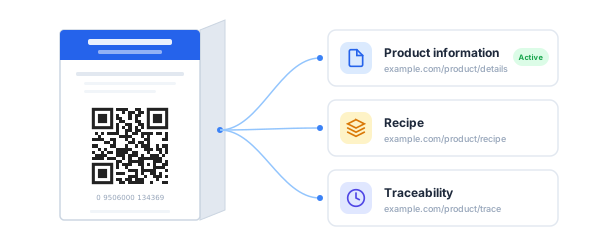
Traditional 1D barcodes (UPC/EAN) only hold a product number. 2D barcodes — QR codes carrying a GS1 Digital Link URI — hold far more. They contain your product identifier (GTIN, SSCC, GLN, etc.) and resolve to web content like product info, traceability data, or recipes.
The key difference: a 2D barcode does double duty. It scans at the checkout register just like a traditional barcode, and it also works as a consumer-facing QR code that links to whatever content you choose.
The retail industry is transitioning to 2D barcodes through GS1's Sunrise 2027 initiative. Hovercode makes it easy to generate compliant codes today — enter your identifier, set your destination URLs, and download a ready-to-print QR code.
Three steps to a compliant QR code
-
1
Enter your product identifier
- Select your identifier type - GTIN, SSCC, GLN, or any of the 15 supported types. Enter the value and optionally add batch/lot number, serial number, or expiry date for traceability.
-
2
Set your destination URLs
- Add a default destination and configure additional GS1 link types - product information, recipe, traceability, safety data, recall status, and more. Each link type points to its own URL.
-
3
Generate your QR code
- Hovercode generates a QR code that encodes a standards-compliant GS1 Digital Link URI. Download it as PNG or SVG, and add it to your product packaging or labels.
15 GS1 identifier types supported
From retail products to shipping containers to returnable assets - Hovercode covers the full range of GS1 Application Identifiers.
GTIN (01)
Global Trade Item Number - retail products
SSCC (00)
Serial Shipping Container Code - logistics
GLN (414)
Global Location Number - physical locations
Party GLN (417)
Global Location Number - legal entities
GDTI (253)
Global Document Type Identifier
GRAI (8003)
Global Returnable Asset Identifier
GIAI (8004)
Global Individual Asset Identifier
GMN (8013)
Global Model Number - regulated products
GSRN (8017/8018)
Global Service Relation Number
Plus GCN, GINC, GSIN, ITIP, CPV, and more.
Organize your product URLs with GS1 link types
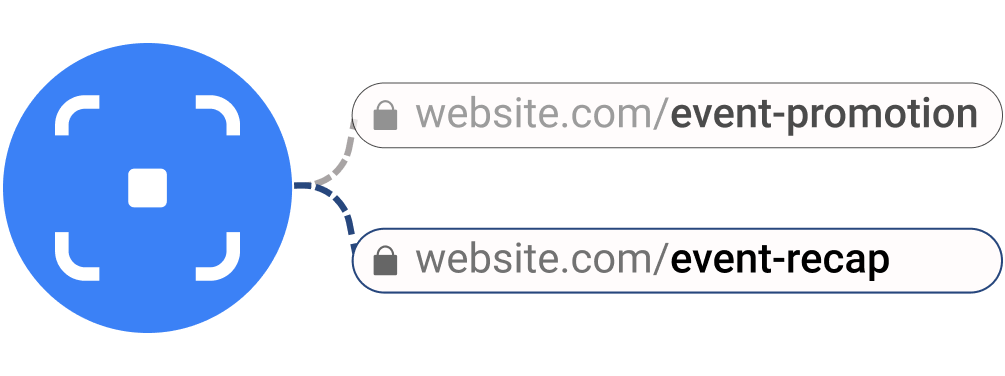
GS1 defines standard categories for the different types of content a product can link to. Hovercode lets you store URLs for each category and choose which one your QR code points to. You can change the active destination anytime without reprinting the code.
16 standard GS1 link types supported:
Plus patient information leaflet, master data, summary of product characteristics, and register product.
Link types for GTIN 09506000134369
Product information
example.com/product/details
Recipe
example.com/product/recipe
Safety information
example.com/product/safety
Traceability
example.com/product/trace
The active link type is where scans are directed. Change it anytime.
1D barcodes vs 2D barcodes
Traditional 1D barcode
- - Holds a product number only
- - Scans at point of sale
- - No consumer interaction
- - Static — can't link to web content
- - No traceability data
GS1 2D barcode
- Holds identifier + web URL + traceability
- Scans at point of sale
- Consumers scan for product info, recipes, reviews
- Destination can be changed anytime
- Batch, serial, and expiry date traceability
Why 2D barcodes matter for your business
Sunrise 2027 is happening
The retail industry is expected to fully transition to 2D barcodes at point of sale by 2027. Retailers are already updating their systems. Being ready now means no scramble later.
One code, two functions
The same 2D barcode that scans at checkout can also take consumers to product information, sustainability data, recipes, or promotions when they scan at home with their phone.
Consumer engagement beyond the shelf
Turn every product into a direct connection with your customer. Link to content that builds trust and loyalty — certifications, sourcing info, how-to guides, and more.
End-to-end traceability
Encode batch/lot numbers, serial numbers, and expiry dates directly in the Digital Link URI. Full supply chain visibility from a single scan.
Built-in validation so you get it right
GS1 identifiers have strict formatting requirements. Hovercode validates everything as you go:
What's included
GS1 Digital Link QR codes are available on all plans, including free. They count toward your dynamic QR code limit.
| Free | Pro | Business | |
|---|---|---|---|
| GS1 Digital Link QR codes | |||
| All 15 identifier types | |||
| All 16 link types | |||
| Batch/lot, serial, expiry | |||
| Custom domain for Digital Link URI |
GS1 QR codes count toward your dynamic QR code limit (3 on free, 100+ on Pro). See all plans
Frequently asked questions
What is a 2D barcode?
A 2D barcode is a QR code that carries a GS1 Digital Link URI — a standardised web address that encodes a product identifier like a GTIN. Unlike traditional 1D barcodes that only hold a number, 2D barcodes work at point of sale and link to web content (product info, traceability, recipes) when consumers scan with their phone.
What is GS1 Sunrise 2027?
Sunrise 2027 is GS1's global initiative to transition retail from traditional 1D barcodes (UPC/EAN) to 2D barcodes at point of sale. The retail industry is expected to fully accept 2D barcodes by 2027. Retailers worldwide are already updating their systems to scan QR codes with GS1 Digital Links.
Can I use my own domain for the Digital Link URI?
Yes. You can connect a custom domain and use it as the base for your GS1 Digital Link URIs. The QR code will encode a URI like https://yourdomain.com/01/09506000134369 instead of using the default Hovercode domain.
Which identifier types are supported?
Hovercode supports 15 GS1 Application Identifiers: GTIN (01), SSCC (00), GLN (414), Party GLN (417), GDTI (253), GCN (255), GINC (401), GSIN (402), GRAI (8003), GIAI (8004), ITIP (8006), CPV (8010), GMN (8013), GSRN Provider (8017), and GSRN Recipient (8018).
Can I add batch/lot and serial numbers?
Yes. When creating a GS1 QR code, you can optionally add a batch/lot number (AI 10), serial number (AI 21), and expiry date (AI 17). These are encoded directly in the Digital Link URI for full supply chain traceability.
Does Hovercode validate my identifiers?
Yes. Hovercode validates check digits (GS1 mod-10 algorithm), identifier length, and format (numeric vs. alphanumeric) based on the identifier type. You'll see validation errors before generating the QR code, so you know it's correct.
More than GS1 QR codes
Hovercode is a complete QR code platform with tracking, branded codes, custom domains, and more.
Get GS1 compliant before the deadline
Book a demo to see how Hovercode handles GS1 Digital Link QR codes for your products. Or sign up and start generating compliant codes right away.