Custom domains for more reliable dynamic QR codes
Dynamic QR codes are codes that include scan tracking and that can be edited after printing.
They work by encoding a redirect link into the pattern of the QR code rather than the scan destination directly.
By default, the redirect link uses a domain that’s owned by the QR code platform of your choice. For example, at Hovercode, we have a few default domains we use for redirect links like “scango.to” or “hov.to”
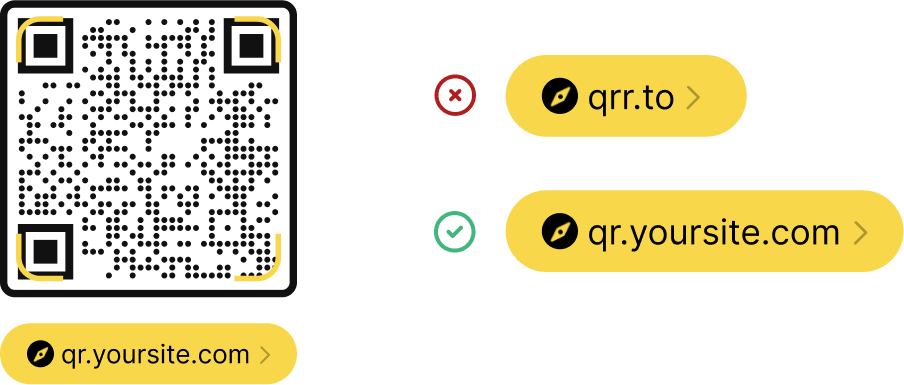
When people hover over codes using these redirect links, that’s what they see. When they tap on the QR code to open the link, they are almost instantly redirected to your scan destination (e.g. your website or Instagram profile).
This is fine generally - most QR codes these days are dynamic and they use default redirect domains, so consumers are used to it.
But… there are some downsides to using default redirect domains and if you’re on any of the Hovercode paid plans, including our lowest plan (Pro), you can connect a custom domain.
It’s totally worth doing this as it makes your QR code more reliable and trustworthy.
Let me explain…
What is a custom domain?
The custom domain feature lets you connect your own domain to Hovercode, which can then be used for the redirect links on your QR codes instead of one of our default domains like hov.to. So for example, if your website is at yoursite.com, you can connect go.yoursite.com to Hovercode. Then when you create a dynamic QR code, it will use go.yoursite.com to create the redirect link.
What are the benefits of custom domains vs default domains?
In short:
- Custom domains are more trustworthy
- Custom domains are more reliable as they are used only by you
- Custom domains make it possible to move providers while keeping your codes active
Custom domains are more trustworthy
The first and most obvious issue is that when people scan a dynamic QR code that uses a default domain, that’s what they see as they hover over the code with their camera. They see hov.to for example, and are then redirected to the scan destination after tapping the code to open it.
With your custom domain, they would see that instead. E.g. go.yoursite.com. This builds trust and lets them feel more sure that the QR code will redirect to the correct scan destination.

Note that the QR code doesn’t need to redirect to a scan destination from the same site. So if you connect go.yoursite.com, the QR code can still redirect to facebook.com or any other site. The custom domain still adds a layer of trust to your QR code though, as only you and your company have control of your domain (e.g. yoursite.com)
Custom domains are more reliable
One of the less obvious benefits of connecting a custom domain is it makes your QR code more reliable. Occasionally, people use QR code for shady things like phishing or spam. At Hovercode, we have many measures in place to stop people doing this, and when they do we flag and remove them ASAP, but it does still happen on occasion. When it does, antivirus software services and content blockers can block our default domains (like scango.to) until they are sure any issues with the spammers are solved. This can cause reliability issues for all QR codes using that domain.
When you connect your custom domain, it can only be used by you to create QR codes. So no one can use that domain for shady reasons, so they won’t ever be blocked by antivirus services and the likes. When we have issues with default domains, your codes remain unaffected.
Custom domains makes it possible to change providers and keep your codes alive
One final reason that custom domains make for more reliable and long term QR codes is that if you ever decided to stop using Hovercode for whatever reason, it makes it possible to create your own custom system to move to another provider to keep your existing codes active. This is not possible when using the default domains.
Why you should connect a custom domain?
If you already own a domain and you’re on any of the Hovercode paid plans, there’s no downside! It's straightforward to do and it makes your dynamic QR codes more reliable and trustworthy!
Tips to keep in mind when connecting a custom domain
- Keep the domain as short as possible (e.g. go.yoursite.com is better than hello.yoursite.com as it means the resulting QR codes are less "complex")
- Use a domain you know you will control for a long time
- Use a domain that your customers will recognise and trust
Reach out if you are unsure about anything related to custom domains or dynamic QR codes in general!